管理动作Link to this heading
Django 的管理员的基本工作流程,简而言之,就是“选择一个对象,然后更改它”。这对于大多数用例来说都很好用。然而,如果你需要同时对许多对象进行相同的更改,这种工作流程可能会相当乏味。
在这种情况下,Django 的管理可以让你编写和注册“动作”——即使用在变更列表页面上选择的对象列表调用的函数。
如果你在管理中查看任何变化列表,你会看到这个功能的作用;Django 自带了一个“删除选定对象”的动作,所有模型都可以使用。例如,这里是 Django 内置的用户模块 django.contrib.auth 应用:
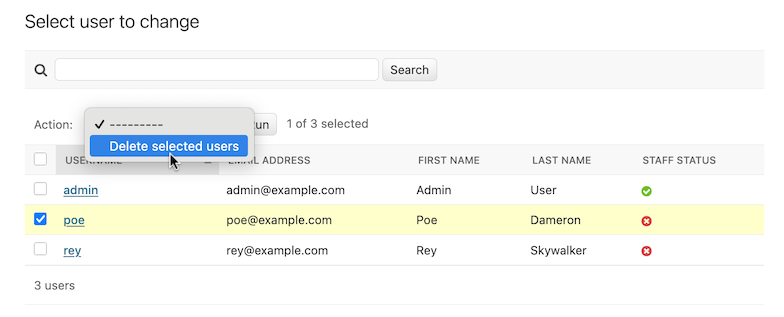
请继续阅读,了解如何将自己的动作添加到此列表中。
编写动作Link to this heading
解释动作的最简单的方法就是举例说明,所以让我们潜心研究。
管理动作的一个常见用例是模型的批量更新。想象一下,一个新闻应用程序有一个 Article 模型:
from django.db import models

STATUS_CHOICES = {
    "d": "Draft",
    "p": "Published",
    "w": "Withdrawn",
}


class Article(models.Model):
    title = models.CharField(max_length=100)
    body = models.TextField()
    status = models.CharField(max_length=1, choices=STATUS_CHOICES)

    def __str__(self):
        return self.title
我们可能会用这样的模型来执行一个常见的任务,就是将一篇文章的状态从 “草稿” 更新为 “已发布”。我们可以很容易地在管理员中一次只发布一篇文章,但如果我们想批量发布一组文章,就会很繁琐。所以,让我们编写一个动作,让我们可以把一篇文章的状态改为 “已发布”。
编写动作函数Link to this heading
首先,我们需要写一个函数,当管理触发动作时就会被调用。动作函数是常规函数,它有三个参数:
当前
ModelAdmin一个代表当前请求的
HttpRequest,一个包含用户所选择的对象集合的
QuerySet。
我们的 publish-these-articles 函数不需要 ModelAdmin 或请求对象,但我们将使用此查询集:
def make_published(modeladmin, request, queryset):
    queryset.update(status="p")
其实这就是写一个动作的全部内容了!然而,我们将再采取一个可选的但很有用的步骤,在管理中给这个动作一个 “漂亮” 的标题。默认情况下,这个操作会在操作列表中显示为 “Make published” —— 函数名称,下划线用空格代替。这很好,但我们可以通过在 make_published 函数上使用 action() 装饰器来提供一个更好的、更人性化的名称:
from django.contrib import admin

...


@admin.action(description="Mark selected stories as published")
def make_published(modeladmin, request, queryset):
    queryset.update(status="p")
在 ModelAdmin 中添加动作Link to this heading
接下来,我们需要通知我们的 ModelAdmin 的动作。这就像其他配置选项一样。因此,完整的 admin.py 中包含了动作及其注册的内容,看起来是这样的:
from django.contrib import admin
from myapp.models import Article


@admin.action(description="Mark selected stories as published")
def make_published(modeladmin, request, queryset):
    queryset.update(status="p")


class ArticleAdmin(admin.ModelAdmin):
    list_display = ["title", "status"]
    ordering = ["title"]
    actions = [make_published]


admin.site.register(Article, ArticleAdmin)
这段代码会给我们一个管理变更列表,看起来像这样:
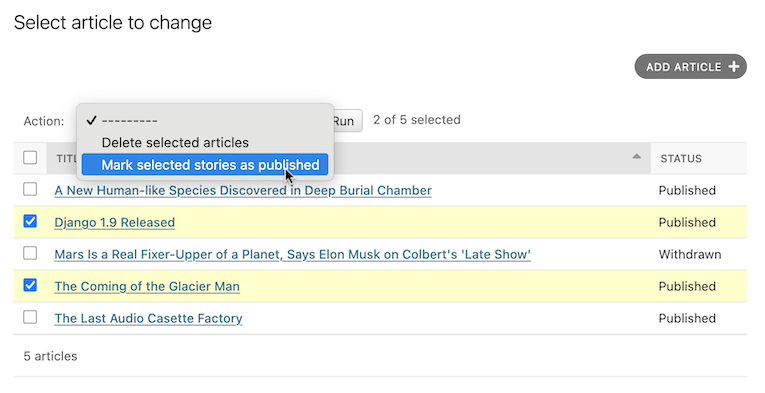
这其实就是全部的内容了!如果你渴望编写自己的动作,你现在已经知道了足够的知识,可以开始了。本文档的其余部分涵盖了更多的高级技术。
处理动作中的错误Link to this heading
如果在运行你的动作时可能出现可预见的错误情况,你应该优雅地告知用户问题。这意味着处理异常,并使用 django.contrib.admin.ModelAdmin.message_user() 在响应中显示一个用户友好的问题描述。
进阶动作技巧Link to this heading
有几个额外的选项和可能性,你可以利用它们实现更高级的选项。
作为 ModelAdmin 方法的动作Link to this heading
上面的例子显示了 make_published 动作被定义为一个函数。这很好,但从代码设计的角度来看并不完美:由于该动作与 Article 对象紧密耦合,因此将该动作挂到 ArticleAdmin 对象本身是合理的。
你可以这样做:
class ArticleAdmin(admin.ModelAdmin):
    ...

    actions = ["make_published"]

    @admin.action(description="Mark selected stories as published")
    def make_published(self, request, queryset):
        queryset.update(status="p")
请注意,首先我们把 make_published 移到了一个方法中,并把 modeladmin 参数重命名为 self,其次我们现在把字符串 'make_published' 放在了 actions 中,而不是直接的函数引用。这就告诉 ModelAdmin 把动作作为方法来查找。
将动作定义为方法,让动作对 ModelAdmin 本身有更多的习惯用法,允许动作调用管理提供的任何方法。
例如,我们可以使用 self 向用户发送一条消息,通知他们操作成功:
from django.contrib import messages
from django.utils.translation import ngettext


class ArticleAdmin(admin.ModelAdmin):
    ...

    def make_published(self, request, queryset):
        updated = queryset.update(status="p")
        self.message_user(
            request,
            ngettext(
                "%d story was successfully marked as published.",
                "%d stories were successfully marked as published.",
                updated,
            )
            % updated,
            messages.SUCCESS,
        )
This makes the action match what the admin itself does after successfully performing an action:
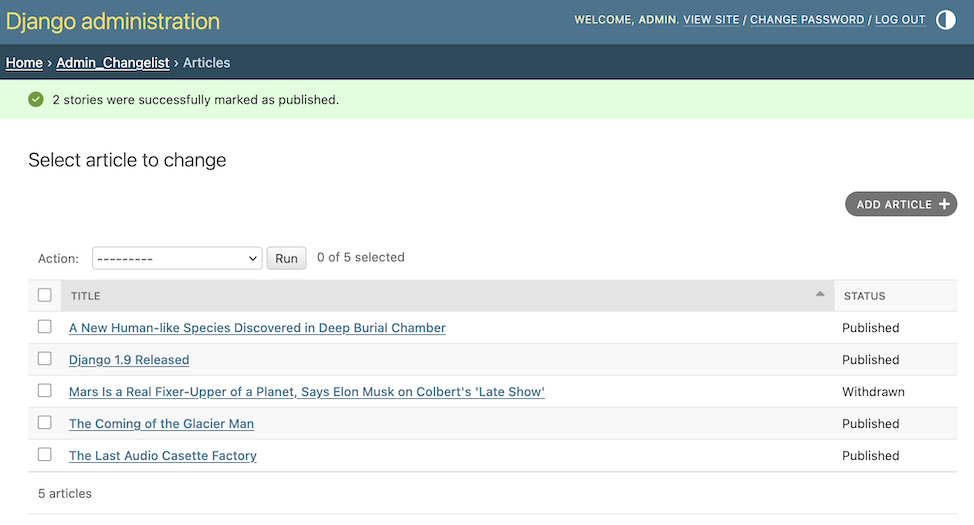
提供中间页的动作Link to this heading
默认情况下,在执行完一个操作后,用户会被重定向回原来的变更列表页面。但是,有些操作,尤其是比较复杂的操作,需要返回中间页面。例如,内置的删除操作在删除所选对象之前会要求确认。
要提供一个中间页,从你的操作中返回一个 HttpResponse (或子类)。例如,你可以写一个导出函数,使用 Django 的 序列化函数 将一些选定的对象转储为 JSON:
from django.core import serializers
from django.http import HttpResponse


def export_as_json(modeladmin, request, queryset):
    response = HttpResponse(content_type="application/json")
    serializers.serialize("json", queryset, stream=response)
    return response
一般来说,像上面这样的东西并不被认为是一个好主意。大多数时候,最好的做法是返回一个 HttpResponseRedirect,并将用户重定向到你编写的视图,在 GET 查询字符串中传递所选对象的列表。这样你就可以在中间页面上提供复杂的交互逻辑。例如,如果你想提供一个更完整的导出功能,你会想让用户选择一种格式,也可能是一个要包含在导出中的字段列表。最好的办法是写一个小的动作,重定向到你的自定义导出视图:
from django.contrib.contenttypes.models import ContentType
from django.http import HttpResponseRedirect


def export_selected_objects(modeladmin, request, queryset):
    selected = queryset.values_list("pk", flat=True)
    ct = ContentType.objects.get_for_model(queryset.model)
    return HttpResponseRedirect(
        "/export/?ct=%s&ids=%s"
        % (
            ct.pk,
            ",".join(str(pk) for pk in selected),
        )
    )
正如你所看到的,这个动作相当简短;所有复杂的逻辑都属于你的导出视图。这将需要处理任何类型的对象,因此有 ContentType 的业务。
如何编写这个视图,就留给读者去练习。
在整个站点提供动作Link to this heading
- AdminSite.add_action(action, name=None)Link to this definition
Some actions are best if they're made available to any object in the admin site -- the export action defined above would be a good candidate. You can make an action globally available using
AdminSite.add_action(). For example:from django.contrib import admin admin.site.add_action(export_selected_objects)This makes the
export_selected_objectsaction globally available as an action named "export_selected_objects". You can explicitly give the action a name -- good if you later want to programmatically remove the action -- by passing a second argument toAdminSite.add_action():admin.site.add_action(export_selected_objects, "export_selected")
禁用动作Link to this heading
有时你需要针对特定对象禁用某些动作 —— 特别是那些 全站点注册的。有几种方法可以禁用动作:
禁用全站点动作Link to this heading
- AdminSite.disable_action(name)Link to this definition
If you need to disable a site-wide action you can call
AdminSite.disable_action().例如,你可以使用此方法来删除内置的 “删除选定对象” 动作:
admin.site.disable_action("delete_selected")一旦你完成了上述操作,该动作将不再在全站范围内使用。
然而,如果你需要重新启用一个在全局禁用的操作,针对特定模型,你需要在你的
ModelAdmin.actions列表中明确列出它:# Globally disable delete selected admin.site.disable_action("delete_selected") # This ModelAdmin will not have delete_selected available class SomeModelAdmin(admin.ModelAdmin): actions = ["some_other_action"] ... # This one will class AnotherModelAdmin(admin.ModelAdmin): actions = ["delete_selected", "a_third_action"] ...
禁用特定 ModelAdmin 的所有动作Link to this heading
如果你想让给定的 ModelAdmin 没有 批量操作,请将 ModelAdmin.actions 设置为 None :
class MyModelAdmin(admin.ModelAdmin):
    actions = None
这告诉 ModelAdmin 不显示或允许任何操作,包括任何 全站点动作。
有条件地启用或禁用动作Link to this heading
- ModelAdmin.get_actions(request, action_location=ActionLocation.CHANGE_LIST)Link to this definition
最后,你可以通过覆盖
ModelAdmin.get_actions()来有条件地启用或禁用每个请求(也就是每个用户)的动作。This returns a dictionary of actions allowed for the specific
action_location. The keys are action names, and the values areActionobjects.例如,如果你只想让名字以 “J” 开头的用户能够批量删除对象:
class MyModelAdmin(admin.ModelAdmin):
    ...

    def get_actions(self, request, action_location=ActionLocation.CHANGE_LIST):
        actions = super().get_actions(request, action_location=action_location)
        if request.user.username[0].upper() != "J":
            if "delete_selected" in actions:
                del actions["delete_selected"]
        return actions
设置动作的权限Link to this heading
通过使用 action() 装饰器包装动作函数,并传递 permissions 参数:,动作可以限制其对具有特定权限的用户的可用性。
@admin.action(permissions=["change"])
def make_published(modeladmin, request, queryset):
    queryset.update(status="p")
The make_published() action will only be available to users that pass the
ModelAdmin.has_change_permission() check when it is called with
obj=None.
如果 permissions 有一个以上的权限,只要用户至少通过了一项检查,该操作就可以使用。
permissions 和相应的方法检查的可用值是:
'change':ModelAdmin.has_change_permission()'delete':ModelAdmin.has_delete_permission()'view':ModelAdmin.has_view_permission()
你可以指定任何其他的值,只要你在 ModelAdmin 上实现一个相应的 has_<value>_permission(self, request) 方法。
例子:
from django.contrib import admin
from django.contrib.auth import get_permission_codename


class ArticleAdmin(admin.ModelAdmin):
    actions = ["make_published"]

    @admin.action(permissions=["publish"])
    def make_published(self, request, queryset):
        queryset.update(status="p")

    def has_publish_permission(self, request):
        """Does the user have the publish permission?"""
        opts = self.opts
        codename = get_permission_codename("publish", opts)
        return request.user.has_perm("%s.%s" % (opts.app_label, codename))
The admin doesn't automatically check object-level permissions for each selected object when executing an action. To limit which objects an action may modify based on object-level permissions, perform those checks in the action itself. For example:
class ArticleAdmin(admin.ModelAdmin):
    actions = ["make_published"]

    @admin.action(permissions=["change"])
    def make_published(self, request, queryset):
        for obj in queryset:
            if self.has_change_permission(request, obj=obj):
                obj.status = "p"
                obj.save(update_fields=["status"])
Controlling where actions are availableLink to this heading
By default, admin actions are available on the change list page only. You can
control where an action appears using the location argument of the
@admin.action decorator.
For example, to make an action available only on the change form, set
location to ActionLocation.CHANGE_FORM:
from django.contrib import admin
from django.contrib.admin import ActionLocation


@admin.action(location=ActionLocation.CHANGE_FORM)
def make_published(modeladmin, request, queryset): ...
To make an action available on both the change list and the change form:
@admin.action(
    location=[ActionLocation.CHANGE_FORM, ActionLocation.CHANGE_LIST],
    description="Publish",
    description_plural="Mark selected stories as published",
)
def make_published(modeladmin, request, queryset): ...
Notice that description and description_plural were provided. These are
optional but the admin action will be labeled by description in the admin
change form and description_plural in the admin change list.
You can customize how actions are rendered by overriding admin templates.
The change list page uses admin/actions.html and the change form page uses
admin/change_form_actions.html. Note that the change form template inherits
from the change list actions template.
action 装饰器Link to this heading
- action(*, permissions=None, description=None, description_plural=None, location=ActionLocation.CHANGE_LIST)Link to this definition
这个装饰器可以用来设置自定义动作函数的特定属性,可以使用
actions:@admin.action( permissions=["publish"], description="Mark selected stories as published", ) def make_published(self, request, queryset): queryset.update(status="p")这就相当于直接在函数上设置一些属性(用原来的、较长的名字):
def make_published(self, request, queryset):
    queryset.update(status="p")


make_published.allowed_permissions = ["publish"]
make_published.short_description = "Mark selected stories as published"
使用这个装饰器并不是制作一个动作函数的必要条件,但在你的源码中使用它而不使用参数作为标记来识别函数的目的是很有用的:
@admin.action
def make_inactive(self, request, queryset):
    queryset.update(is_active=False)
在这种情况下,它将不会给函数添加任何属性。
- 参数:
permissions -- A list of permission codenames that restrict the action to users who have at least one of the defined permissions. This sets the
allowed_permissionsattribute on the function. See 设置动作的权限 for details.description -- A human-readable description of the action to be rendered in the admin. If
descriptionis not provided, Django renders the function's name, converting underscores to spaces and capitalizing the first letter of the first word. This sets theshort_descriptionattribute on the function.description_plural -- A human-readable description of the action used in contexts where plural wording is required, such as on the admin change list. If
description_pluralis not provided, falls back todescription. This sets theplural_descriptionattribute on the function.location -- Specifies where the action is available. Accepts either a single
ActionLocationvalue or an iterable of values. If omitted, the action is only available on the admin change list. See Controlling where actions are available for details.
ActionLocationLink to this heading
- class ActionLocationLink to this definition
Enum of allowed values for the
locationparameter of theaction()decorator.- CHANGE_FORMLink to this definition
The action is available on the admin change form. When an action is run, any unsaved changes on the admin change form will be lost.
- CHANGE_LISTLink to this definition
The action is available on the admin change list.
ActionLink to this heading
- class ActionLink to this definition
Represents an action. Actions should be defined using the
action()decorator.- funcLink to this definition
The action function. See 编写动作函数 for details.
- nameLink to this definition
The action function name.
- descriptionLink to this definition
A human-readable description of the action to be rendered in the admin.
- plural_descriptionLink to this definition
A human-readable description of the action used in contexts where plural wording is required.
- locationsLink to this definition
A list of
ActionLocationvalues the admin action can be rendered.