Admin actionsLink to this heading
The basic workflow of Django's admin is, in a nutshell, "select an object, then change it." This works well for a majority of use cases. However, if you need to make the same change to many objects at once, this workflow can be quite tedious.
In these cases, Django's admin lets you write and register "actions" -- functions that get called with a list of objects selected on the change list page.
If you look at any change list in the admin, you'll see this feature in
action; Django ships with a "delete selected objects" action available to all
models. For example, here's the user module from Django's built-in
django.contrib.auth app:
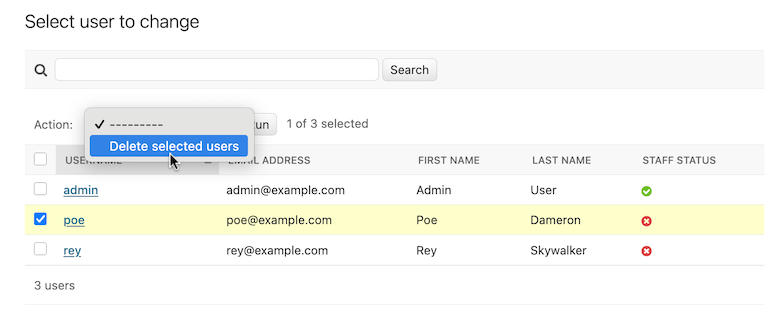
Read on to find out how to add your own actions to this list.
Writing actionsLink to this heading
The easiest way to explain actions is by example, so let's dive in.
A common use case for admin actions is the bulk updating of a model. Imagine a
news application with an Article model:
from django.db import models

STATUS_CHOICES = {
    "d": "Draft",
    "p": "Published",
    "w": "Withdrawn",
}


class Article(models.Model):
    title = models.CharField(max_length=100)
    body = models.TextField()
    status = models.CharField(max_length=1, choices=STATUS_CHOICES)

    def __str__(self):
        return self.title
A common task we might perform with a model like this is to update an article's status from "draft" to "published". We could easily do this in the admin one article at a time, but if we wanted to bulk-publish a group of articles, it'd be tedious. So, let's write an action that lets us change an article's status to "published."
Writing action functionsLink to this heading
First, we'll need to write a function that gets called when the action is triggered from the admin. Action functions are regular functions that take three arguments:
The current
ModelAdminAn
HttpRequestrepresenting the current request,A
QuerySetcontaining the set of objects selected by the user.
Our publish-these-articles function won't need the ModelAdmin or the
request object, but we will use the queryset:
def make_published(modeladmin, request, queryset):
    queryset.update(status="p")
That's actually all there is to writing an action! However, we'll take one
more optional-but-useful step and give the action a "nice" title in the admin.
By default, this action would appear in the action list as "Make published" --
the function name, with underscores replaced by spaces. That's fine, but we
can provide a better, more human-friendly name by using the
action() decorator on the make_published
function:
from django.contrib import admin

...


@admin.action(description="Mark selected stories as published")
def make_published(modeladmin, request, queryset):
    queryset.update(status="p")
Adding actions to the ModelAdminLink to this heading
Next, we'll need to inform our ModelAdmin of the action. This works
just like any other configuration option. So, the complete admin.py with
the action and its registration would look like:
from django.contrib import admin
from myapp.models import Article


@admin.action(description="Mark selected stories as published")
def make_published(modeladmin, request, queryset):
    queryset.update(status="p")


class ArticleAdmin(admin.ModelAdmin):
    list_display = ["title", "status"]
    ordering = ["title"]
    actions = [make_published]


admin.site.register(Article, ArticleAdmin)
That code will give us an admin change list that looks something like this:
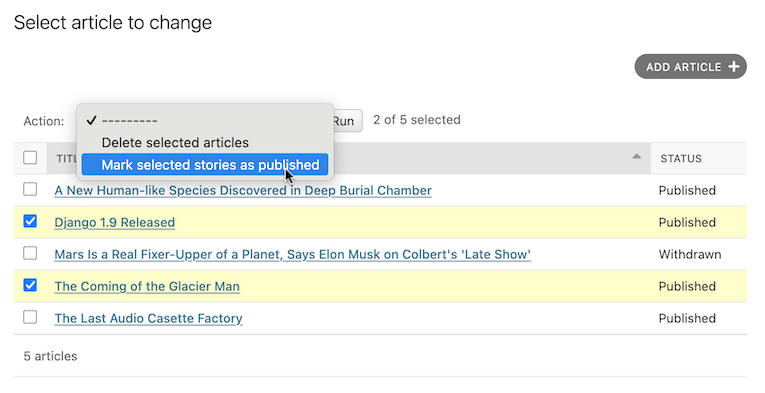
That's really all there is to it! If you're itching to write your own actions, you now know enough to get started. The rest of this document covers more advanced techniques.
Handling errors in actionsLink to this heading
If there are foreseeable error conditions that may occur while running your
action, you should gracefully inform the user of the problem. This means
handling exceptions and using
django.contrib.admin.ModelAdmin.message_user() to display a user friendly
description of the problem in the response.
Advanced action techniquesLink to this heading
There's a couple of extra options and possibilities you can exploit for more advanced options.
Actions as ModelAdmin methodsLink to this heading
The example above shows the make_published action defined as a function.
That's perfectly fine, but it's not perfect from a code design point of view:
since the action is tightly coupled to the Article object, it makes sense
to hook the action to the ArticleAdmin object itself.
You can do it like this:
class ArticleAdmin(admin.ModelAdmin):
    ...

    actions = ["make_published"]

    @admin.action(description="Mark selected stories as published")
    def make_published(self, request, queryset):
        queryset.update(status="p")
Notice first that we've moved make_published into a method and renamed the
modeladmin parameter to self, and second that we've now put the string
'make_published' in actions instead of a direct function reference.
This tells the ModelAdmin to look up the action as a method.
Defining actions as methods gives the action more idiomatic access to the
ModelAdmin itself, allowing the action to call any of the methods
provided by the admin.
For example, we can use self to flash a message to the user informing them
that the action was successful:
from django.contrib import messages
from django.utils.translation import ngettext


class ArticleAdmin(admin.ModelAdmin):
    ...

    def make_published(self, request, queryset):
        updated = queryset.update(status="p")
        self.message_user(
            request,
            ngettext(
                "%d story was successfully marked as published.",
                "%d stories were successfully marked as published.",
                updated,
            )
            % updated,
            messages.SUCCESS,
        )
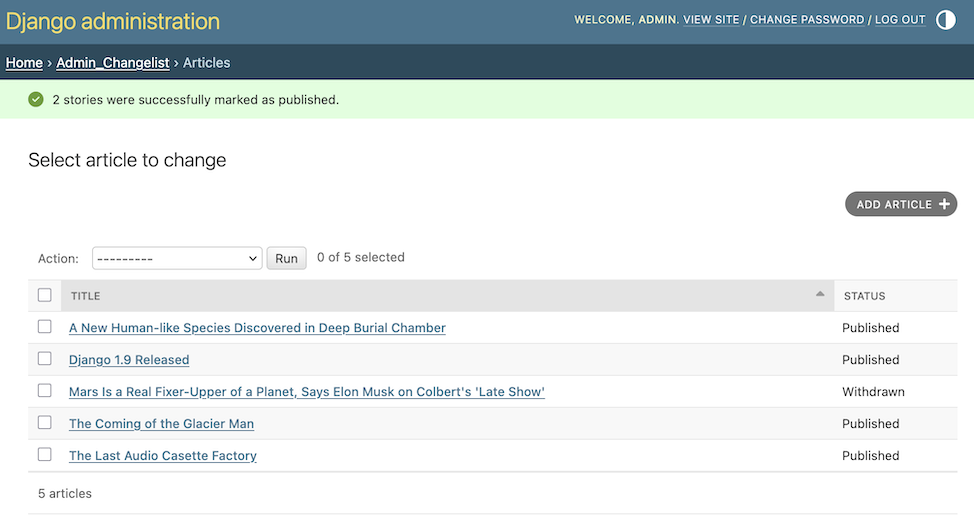
This makes the action match what the admin itself does after successfully performing an action:
Actions that provide intermediate pagesLink to this heading
By default, after an action is performed the user is redirected back to the original change list page. However, some actions, especially more complex ones, will need to return intermediate pages. For example, the built-in delete action asks for confirmation before deleting the selected objects.
To provide an intermediary page, return an HttpResponse
(or subclass) from your action. For example, you might write an export function
that uses Django's serialization functions to
dump some selected objects as JSON:
from django.core import serializers
from django.http import HttpResponse


def export_as_json(modeladmin, request, queryset):
    response = HttpResponse(content_type="application/json")
    serializers.serialize("json", queryset, stream=response)
    return response
Generally, something like the above isn't considered a great idea. Most of the
time, the best practice will be to return an
HttpResponseRedirect and redirect the user to a view
you've written, passing the list of selected objects in the GET query string.
This allows you to provide complex interaction logic on the intermediary
pages. For example, if you wanted to provide a more complete export function,
you'd want to let the user choose a format, and possibly a list of fields to
include in the export. The best thing to do would be to write a small action
that redirects to your custom export view:
from django.contrib.contenttypes.models import ContentType
from django.http import HttpResponseRedirect


def export_selected_objects(modeladmin, request, queryset):
    selected = queryset.values_list("pk", flat=True)
    ct = ContentType.objects.get_for_model(queryset.model)
    return HttpResponseRedirect(
        "/export/?ct=%s&ids=%s"
        % (
            ct.pk,
            ",".join(str(pk) for pk in selected),
        )
    )
As you can see, the action is rather short; all the complex logic would belong
in your export view. This would need to deal with objects of any type, hence
the business with the ContentType.
Writing this view is left as an exercise to the reader.
Making actions available site-wideLink to this heading
- AdminSite.add_action(action, name=None)Link to this definition
Some actions are best if they're made available to any object in the admin site -- the export action defined above would be a good candidate. You can make an action globally available using
AdminSite.add_action(). For example:from django.contrib import admin admin.site.add_action(export_selected_objects)This makes the
export_selected_objectsaction globally available as an action named "export_selected_objects". You can explicitly give the action a name -- good if you later want to programmatically remove the action -- by passing a second argument toAdminSite.add_action():admin.site.add_action(export_selected_objects, "export_selected")
Disabling actionsLink to this heading
Sometimes you need to disable certain actions -- especially those registered site-wide -- for particular objects. There's a few ways you can disable actions:
Disabling a site-wide actionLink to this heading
- AdminSite.disable_action(name)Link to this definition
If you need to disable a site-wide action you can call
AdminSite.disable_action().For example, you can use this method to remove the built-in "delete selected objects" action:
admin.site.disable_action("delete_selected")Once you've done the above, that action will no longer be available site-wide.
If, however, you need to reenable a globally-disabled action for one particular model, list it explicitly in your
ModelAdmin.actionslist:# Globally disable delete selected admin.site.disable_action("delete_selected") # This ModelAdmin will not have delete_selected available class SomeModelAdmin(admin.ModelAdmin): actions = ["some_other_action"] ... # This one will class AnotherModelAdmin(admin.ModelAdmin): actions = ["delete_selected", "a_third_action"] ...
Disabling all actions for a particular ModelAdminLink to this heading
If you want no bulk actions available for a given ModelAdmin, set
ModelAdmin.actions to None:
class MyModelAdmin(admin.ModelAdmin):
    actions = None
This tells the ModelAdmin to not display or allow any actions,
including any site-wide actions.
Conditionally enabling or disabling actionsLink to this heading
- ModelAdmin.get_actions(request, action_location=ActionLocation.CHANGE_LIST)Link to this definition
Finally, you can conditionally enable or disable actions on a per-request (and hence per-user basis) by overriding
ModelAdmin.get_actions().This returns a dictionary of actions allowed for the specific
action_location. The keys are action names, and the values areActionobjects.For example, if you only want users whose names begin with 'J' to be able to delete objects in bulk:
class MyModelAdmin(admin.ModelAdmin):
    ...

    def get_actions(self, request, action_location=ActionLocation.CHANGE_LIST):
        actions = super().get_actions(request, action_location=action_location)
        if request.user.username[0].upper() != "J":
            if "delete_selected" in actions:
                del actions["delete_selected"]
        return actions
Setting permissions for actionsLink to this heading
Actions may limit their availability to users with specific permissions by
wrapping the action function with the action()
decorator and passing the permissions argument:
@admin.action(permissions=["change"])
def make_published(modeladmin, request, queryset):
    queryset.update(status="p")
The make_published() action will only be available to users that pass the
ModelAdmin.has_change_permission() check when it is called with
obj=None.
If permissions has more than one permission, the action will be available
as long as the user passes at least one of the checks.
Available values for permissions and the corresponding method checks are:
'change':ModelAdmin.has_change_permission()'delete':ModelAdmin.has_delete_permission()'view':ModelAdmin.has_view_permission()
You can specify any other value as long as you implement a corresponding
has_<value>_permission(self, request) method on the ModelAdmin.
For example:
from django.contrib import admin
from django.contrib.auth import get_permission_codename


class ArticleAdmin(admin.ModelAdmin):
    actions = ["make_published"]

    @admin.action(permissions=["publish"])
    def make_published(self, request, queryset):
        queryset.update(status="p")

    def has_publish_permission(self, request):
        """Does the user have the publish permission?"""
        opts = self.opts
        codename = get_permission_codename("publish", opts)
        return request.user.has_perm("%s.%s" % (opts.app_label, codename))
The admin doesn't automatically check object-level permissions for each selected object when executing an action. To limit which objects an action may modify based on object-level permissions, perform those checks in the action itself. For example:
class ArticleAdmin(admin.ModelAdmin):
    actions = ["make_published"]

    @admin.action(permissions=["change"])
    def make_published(self, request, queryset):
        for obj in queryset:
            if self.has_change_permission(request, obj=obj):
                obj.status = "p"
                obj.save(update_fields=["status"])
Controlling where actions are availableLink to this heading
By default, admin actions are available on the change list page only. You can
control where an action appears using the location argument of the
@admin.action decorator.
For example, to make an action available only on the change form, set
location to ActionLocation.CHANGE_FORM:
from django.contrib import admin
from django.contrib.admin import ActionLocation


@admin.action(location=ActionLocation.CHANGE_FORM)
def make_published(modeladmin, request, queryset): ...
To make an action available on both the change list and the change form:
@admin.action(
    location=[ActionLocation.CHANGE_FORM, ActionLocation.CHANGE_LIST],
    description="Publish",
    description_plural="Mark selected stories as published",
)
def make_published(modeladmin, request, queryset): ...
Notice that description and description_plural were provided. These are
optional but the admin action will be labeled by description in the admin
change form and description_plural in the admin change list.
You can customize how actions are rendered by overriding admin templates.
The change list page uses admin/actions.html and the change form page uses
admin/change_form_actions.html. Note that the change form template inherits
from the change list actions template.
The action decoratorLink to this heading
- action(*, permissions=None, description=None, description_plural=None, location=ActionLocation.CHANGE_LIST)Link to this definition
This decorator can be used for setting specific attributes on custom action functions that can be used with
actions:@admin.action( permissions=["publish"], description="Mark selected stories as published", ) def make_published(self, request, queryset): queryset.update(status="p")This is equivalent to setting some attributes (with the original, longer names) on the function directly:
def make_published(self, request, queryset):
    queryset.update(status="p")


make_published.allowed_permissions = ["publish"]
make_published.short_description = "Mark selected stories as published"
Use of this decorator is not compulsory to make an action function, but it can be useful to use it without arguments as a marker in your source to identify the purpose of the function:
@admin.action
def make_inactive(self, request, queryset):
    queryset.update(is_active=False)
In this case it will add no attributes to the function.
- パラメータ:
permissions -- A list of permission codenames that restrict the action to users who have at least one of the defined permissions. This sets the
allowed_permissionsattribute on the function. See Setting permissions for actions for details.description -- A human-readable description of the action to be rendered in the admin. If
descriptionis not provided, Django renders the function's name, converting underscores to spaces and capitalizing the first letter of the first word. This sets theshort_descriptionattribute on the function.description_plural -- A human-readable description of the action used in contexts where plural wording is required, such as on the admin change list. If
description_pluralis not provided, falls back todescription. This sets theplural_descriptionattribute on the function.location -- Specifies where the action is available. Accepts either a single
ActionLocationvalue or an iterable of values. If omitted, the action is only available on the admin change list. See Controlling where actions are available for details.
ActionLocationLink to this heading
- class ActionLocationLink to this definition
Enum of allowed values for the
locationparameter of theaction()decorator.- CHANGE_FORMLink to this definition
The action is available on the admin change form. When an action is run, any unsaved changes on the admin change form will be lost.
- CHANGE_LISTLink to this definition
The action is available on the admin change list.
ActionLink to this heading
- class ActionLink to this definition
Represents an action. Actions should be defined using the
action()decorator.- funcLink to this definition
The action function. See Writing action functions for details.
- nameLink to this definition
The action function name.
- descriptionLink to this definition
A human-readable description of the action to be rendered in the admin.
- plural_descriptionLink to this definition
A human-readable description of the action used in contexts where plural wording is required.
- locationsLink to this definition
A list of
ActionLocationvalues the admin action can be rendered.