맞춤 템플릿 백엔드Link to this heading
맞춤 백엔드Link to this heading
다른 템플릿 시스템을 사용하기 위해 사용자 지정 템플릿 백엔드를 구현하는 방법은 다음과 같습니다. 템플릿 백엔드는 ``django.template.backends.base”를 상속하는 클래스입니다.Base Engine’입니다. “get_template()”과 “from_string()”을 구현해야 한다. 가상의 ``푸바” 템플릿 라이브러리의 예는 다음과 같다.
from django.template import TemplateDoesNotExist, TemplateSyntaxError
from django.template.backends.base import BaseEngine
from django.template.backends.utils import csrf_input_lazy, csrf_token_lazy

import foobar


class FooBar(BaseEngine):

    # Name of the subdirectory containing the templates for this engine
    # inside an installed application.
    app_dirname = 'foobar'

    def __init__(self, params):
        params = params.copy()
        options = params.pop('OPTIONS').copy()
        super().__init__(params)

        self.engine = foobar.Engine(**options)

    def from_string(self, template_code):
        try:
            return Template(self.engine.from_string(template_code))
        except foobar.TemplateCompilationFailed as exc:
            raise TemplateSyntaxError(exc.args)

    def get_template(self, template_name):
        try:
            return Template(self.engine.get_template(template_name))
        except foobar.TemplateNotFound as exc:
            raise TemplateDoesNotExist(exc.args, backend=self)
        except foobar.TemplateCompilationFailed as exc:
            raise TemplateSyntaxError(exc.args)


class Template:

    def __init__(self, template):
        self.template = template

    def render(self, context=None, request=None):
        if context is None:
            context = {}
        if request is not None:
            context['request'] = request
            context['csrf_input'] = csrf_input_lazy(request)
            context['csrf_token'] = csrf_token_lazy(request)
        return self.template.render(context)
자세한 내용은 ‘DEP 182’를 참조하십시오.
사용자 지정 엔진을 위한 디버그 통합Link to this heading
Django 디버그 페이지에는 템플릿 오류가 발생할 때 자세한 정보를 제공하는 후크가 있습니다. 사용자 정의 템플릿 엔진은 이러한 후크를 사용하여 사용자에게 표시되는 추적 정보를 향상시킬 수 있습니다. 다음 후크를 사용할 수 있습니다.
템플릿 사후검토Link to this heading
다음 경우:exc:에 사후에:’~django.the’템플릿이 없습니다’가 발생합니다. 지정된 템플릿을 찾을 때 사용된 템플릿 엔진 및 로더가 나열됩니다. 예를 들어 두 개의 Django 엔진이 구성된 경우 사후에 다음과 같이 표시됩니다.
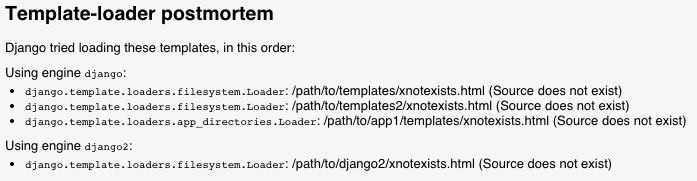
커스텀엔진은 다음과 같은 문제를 제기할 때 ``백엔드”와 “시도한” 주장을 통과시킴으로써 사후에 채워질 수 있다.’~django.the’템플릿이 없습니다. 사후 처리:ref:’를 사용하는 백엔드는 템플릿 개체에 원점을 지정해야 합니다.
맥락선정보Link to this heading
If an error happens during template parsing or rendering, Django can display the line the error happened on. For example:

사용자 지정 엔진은 구문 분석 및 렌더링 중에 발생하는 예외에 대해 “template_debug” 속성을 설정하여 이 정보를 채울 수 있다. 이 속성은 다음 값을 갖는 :class:’dict’입니다.
“이름”: 예외가 발생한 템플릿의 이름입니다.
'message': 예외 메시지.‘’source_lines’’: 예외가 발생한 행의 이전, 이후 및 포함 선. 컨텍스트용이므로 20개 이상의 라인을 포함할 수 없습니다.
“라인”: 예외가 발생한 라인 번호입니다.
“‘before’”: 오류를 발생시킨 토큰 앞의 내용입니다.
'during': 오류를 발생시킨 토큰입니다.'after': 오류를 발생시킨 토큰 뒤에 있는 오류 행의 내용입니다.'total': “source_line”의 줄 수는 다음과 같다.'top': “source_line”이 시작되는 라인 번호이다.'bottom': “source_line”이 끝나는 라인 번호이다.
위의 템플릿 오류로 인해 “template_debug”는 다음과 같이 표시됩니다.
{
    'name': '/path/to/template.html',
    'message': "Invalid block tag: 'syntax'",
    'source_lines': [
        (1, 'some\n'),
        (2, 'lines\n'),
        (3, 'before\n'),
        (4, 'Hello {% syntax error %} {{ world }}\n'),
        (5, 'some\n'),
        (6, 'lines\n'),
        (7, 'after\n'),
        (8, ''),
    ],
    'line': 4,
    'before': 'Hello ',
    'during': '{% syntax error %}',
    'after': ' {{ world }}\n',
    'total': 9,
    'bottom': 9,
    'top': 1,
}
오리진 API 및 타사 통합Link to this heading
Django 템플릿의 :class:’~django.base.오리진 객체는 “template.origin” 속성을 통해 사용할 수 있다. 디버그 정보를 ef:’템플릿 사후에’는 물론, 제3자 도서관에서도 ‘장고 디버그 툴바’와 같은 디버그 정보를 표시할 수 있다.
커스텀 엔진은 다음과 같은 속성을 지정하는 객체를 만들어 자체 ``템플릿.오리진” 정보를 제공할 수 있다.
'name': 템플릿의 전체 경로입니다.'template_name': 템플릿 로드 메서드에 전달된 템플릿에 대한 상대 경로입니다.'loader_name': 템플릿을 로드하는 데 사용되는 함수 또는 클래스를 식별하는 선택적 문자열(예: “django.template.loaders”)입니다.파일 시스템로더’.