Template per il backend personalizzatoLink to this heading
Backend personalizzatiLink to this heading
Here’s how to implement a custom template backend in order to use another
template system. A template backend is a class that inherits
django.template.backends.base.BaseEngine. It must implement
get_template() and optionally from_string(). Here’s an example for a
fictional foobar template library:
from django.template import TemplateDoesNotExist, TemplateSyntaxError
from django.template.backends.base import BaseEngine
from django.template.backends.utils import csrf_input_lazy, csrf_token_lazy

import foobar


class FooBar(BaseEngine):

    # Name of the subdirectory containing the templates for this engine
    # inside an installed application.
    app_dirname = 'foobar'

    def __init__(self, params):
        params = params.copy()
        options = params.pop('OPTIONS').copy()
        super().__init__(params)

        self.engine = foobar.Engine(**options)

    def from_string(self, template_code):
        try:
            return Template(self.engine.from_string(template_code))
        except foobar.TemplateCompilationFailed as exc:
            raise TemplateSyntaxError(exc.args)

    def get_template(self, template_name):
        try:
            return Template(self.engine.get_template(template_name))
        except foobar.TemplateNotFound as exc:
            raise TemplateDoesNotExist(exc.args, backend=self)
        except foobar.TemplateCompilationFailed as exc:
            raise TemplateSyntaxError(exc.args)


class Template:

    def __init__(self, template):
        self.template = template

    def render(self, context=None, request=None):
        if context is None:
            context = {}
        if request is not None:
            context['request'] = request
            context['csrf_input'] = csrf_input_lazy(request)
            context['csrf_token'] = csrf_token_lazy(request)
        return self.template.render(context)
Vedi DEP 182 per maggiori informazioni.
Debug integration for custom enginesLink to this heading
The Django debug page has hooks to provide detailed information when a template error arises. Custom template engines can use these hooks to enhance the traceback information that appears to users. The following hooks are available:
Template postmortemLink to this heading
The postmortem appears when TemplateDoesNotExist is
raised. It lists the template engines and loaders that were used when trying to
find a given template. For example, if two Django engines are configured, the
postmortem will appear like:

Custom engines can populate the postmortem by passing the backend and
tried arguments when raising TemplateDoesNotExist.
Backends that use the postmortem should specify an origin on the template object.
Contextual line informationLink to this heading
Se viene generato un errore durante il parsing o il rendering del template, Django è in grado di mostrare la riga in cui è presente l’errore. Ad esempio:
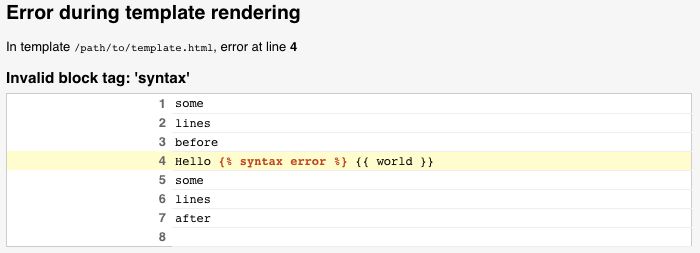
Custom engines can populate this information by setting a template_debug
attribute on exceptions raised during parsing and rendering. This attribute is
a dict with the following values:
'name': Il nome del template in cui è avvenuta l’eccezione.'message': Il messaggio dell’eccezione'source_lines': Le righe prima, dopo e che includono la riga dove è avvenuta l’eccezione. Questo è per il contesto, quindi non dovrebbe contenere più di 20 righe o giù di lì.'line': Il numero di riga in cui è avvenuta l’eccezione.'before': Il contenuto della riga dell’errore prima del token che ha generato l’errore.'during': Il token che ha generato l’errore.'after': Il contenuto della riga dell’errore dopo il token che ha generato l’errore.'total': Il numero di righe insource_lines.'top': Il numero di riga dove iniziasource_lines.'bottom': Il numero di riga dove terminasource_lines.
Dato il template di errore qui sopra, template_debug sarà simile a:
{
    'name': '/path/to/template.html',
    'message': "Invalid block tag: 'syntax'",
    'source_lines': [
        (1, 'some\n'),
        (2, 'lines\n'),
        (3, 'before\n'),
        (4, 'Hello {% syntax error %} {{ world }}\n'),
        (5, 'some\n'),
        (6, 'lines\n'),
        (7, 'after\n'),
        (8, ''),
    ],
    'line': 4,
    'before': 'Hello ',
    'during': '{% syntax error %}',
    'after': ' {{ world }}\n',
    'total': 9,
    'bottom': 9,
    'top': 1,
}
Origin API and 3rd-party integrationLink to this heading
Django templates have an Origin object available
through the template.origin attribute. This enables debug information to be
displayed in the template postmortem, as well as
in 3rd-party libraries, like the Django Debug Toolbar.
Custom engines can provide their own template.origin information by
creating an object that specifies the following attributes:
'name': The full path to the template.'template_name': The relative path to the template as passed into the template loading methods.'loader_name': An optional string identifying the function or class used to load the template, e.g.django.template.loaders.filesystem.Loader.